Exercise 9: 1-wire bus
This activity is supplementary for those who have a hardware. Unfortunately, SimulIde software does not contain any elements communicating via the 1-wire bus, but we encourage you to watch at least the movie to understand the idea.
Main topic:
- 1-wire bus
DS18B20
After creating the library for 1-wire, the next step will be to create a library to the DS18B20 temperature sensor. This sensor measures the temperature in the range \( (-55; +125) ^ o C \) and returns a value in 12-bit form.
Step 3: Create a library to support the DS18B20 sensor:
The library should consist of three functions:
a) initialization function:
The initialization of the DS18B20 sensor consists in resetting the 1-wire bus. It's a good idea to do the reset 2 times. The function should return presence pulse.
b) the function to start the temperature measurement
First, you need to reset the 1-wire bus and then send two commands to the temperature sensor:
1. The first command should force the ROM skipping. We only have one sensor connected so it makes no sense to read the address of the DS18B20 sensor.
2. The second command should force the temperature measurement and conversion of the obtained result. The result will be stored in the scratchpad.
The starting function should return 0 when everything goes correctly or 1 when an error occurs, e.g. the connected sensor is not visible.
c) temperature reading function
First, you need to reset the 1-wire bus and then send two commands to the temperature sensor:
1. The first command should force ROM skipping.
2. The second command should force the value to be read from the scratchpad.
Then two bytes of data must be read. Initially, the sensor will return LSB and then MSB. Note how the temperature is stored: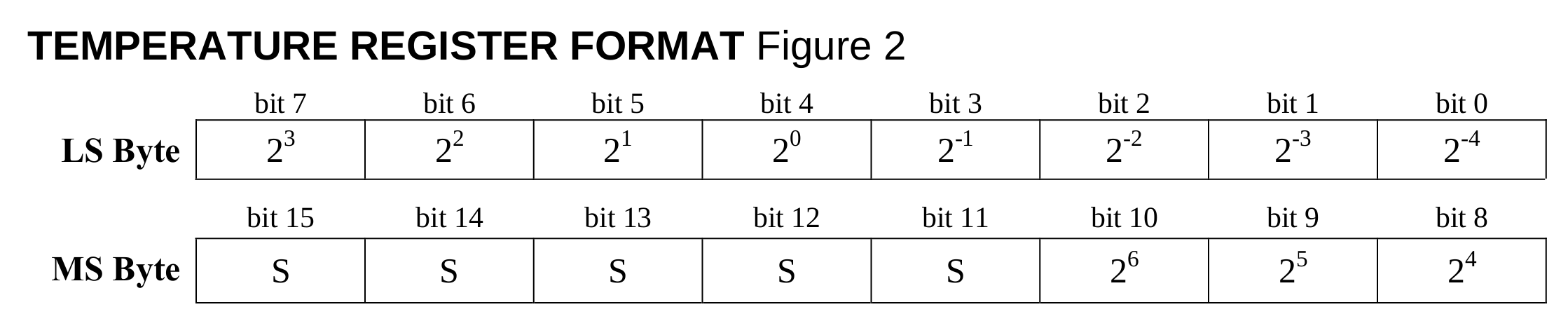
See that in the LS Byte frame, the four youngest bits hold a fraction of the temperature (eg. 0.2). On the other hand, the 4 oldest bits of the LS Byte frame and the 4 youngest bits of the MS Byte frame are the total temperature value.
Try to create your own library to support the DS18B20 sensor based on the above guidelines. Then write the main program in which you will read the temperature and display it on the LCD display. When you're finished, compare the result with the video:
Extended:
1. Expand the program to support the RS232 interface. The microcontroller should return its value to the computer on the incoming temperature reading command.